Forget generic meeting notes. The most effective AI meeting assistant for professionals in 2026 does three things at once: it listens, it organizes, and it acts on your behalf before you’ve even closed your laptop.
Key Takeaways
- The most effective AI meeting assistant for professionals in 2026 is the one that matches your actual workflow, not the one with the longest feature list.
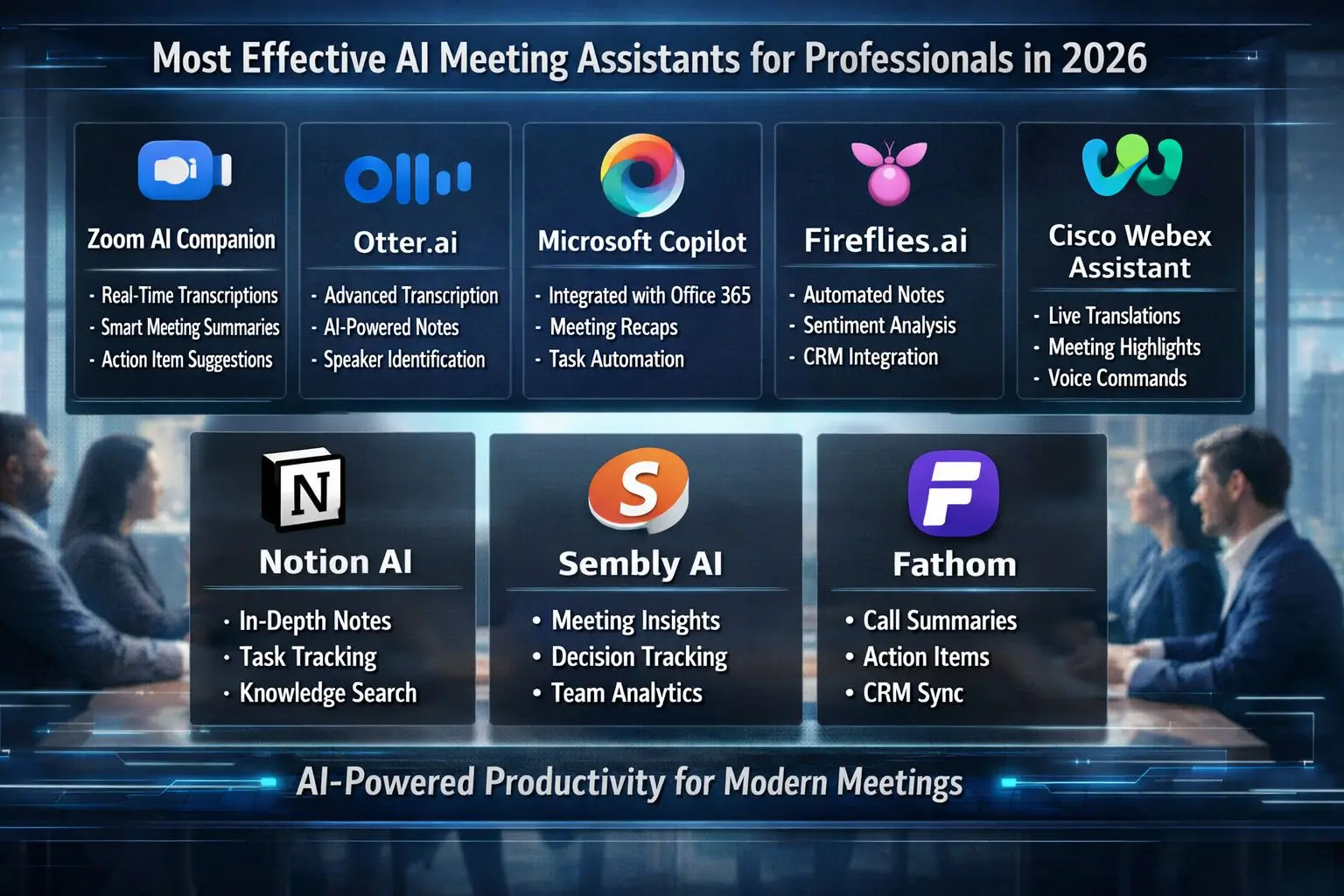
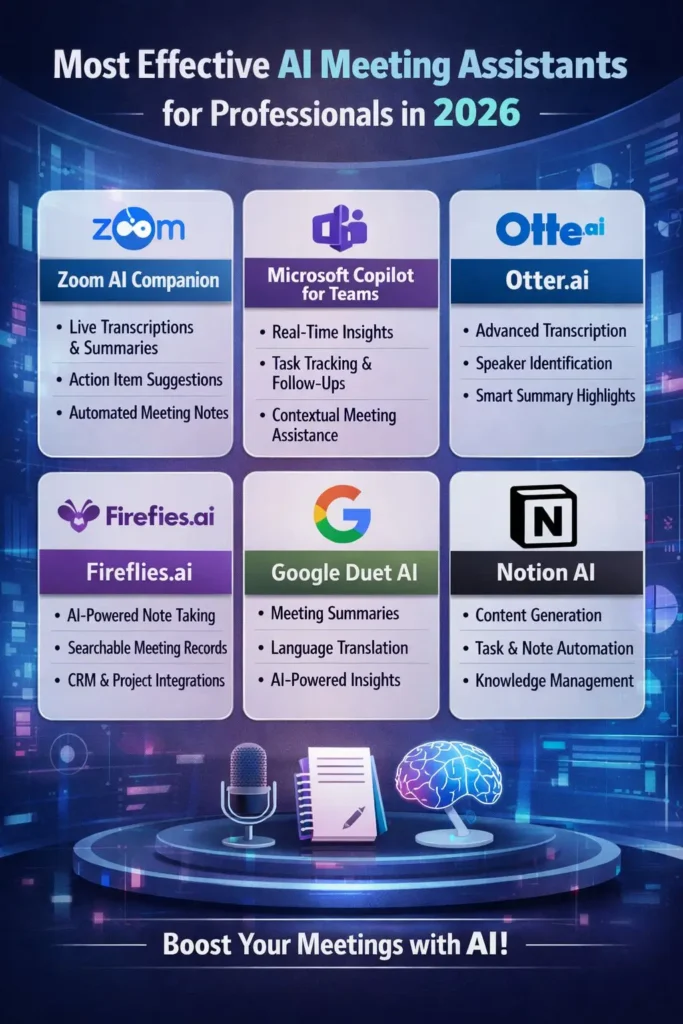
- Tools like Otter.ai, Fireflies.ai, Fathom, Zoom AI Companion, and Microsoft Copilot for Teams each solve a slightly different problem, so picking the “best” one depends on your role and tech stack.
- Real-time transcription, automated action items, and CRM integration are now baseline expectations, not premium add-ons.
- Platforms such as The Non Tech AI are helping non-technical professionals understand and adopt these tools without needing a computer science degree.
- Stick around for the pricing comparison table and setup checklist further down, since that’s where most people make expensive mistakes.
Meetings eat up roughly 23 hours a week for the average manager, according to research cited by Harvard Business Review, and a huge chunk of that time gets wasted on note-taking, follow-ups, and re-explaining decisions that were already made. AI meeting assistants exist to close that gap. They’re not just transcription tools anymore. The good ones now function like a digital chief of staff, quietly tracking commitments and nudging people to follow through.
I’ve tested a dozen of these platforms across sales calls, project standups, and executive briefings, and the gap between a mediocre assistant and a genuinely effective one is massive. Resources like TheNonTechAI have been useful for breaking down which tools actually deliver on their promises versus which ones just look impressive in a demo. That distinction matters more than ever heading into 2026, as AI meeting tools have become crowded with options that all claim to save you time.
What the Best AI Meeting Assistants Do Differently in 2026
The assistants that stand out this year share one trait: they act before you ask. Instead of waiting for you to request a summary, they push it to your inbox within minutes of the call ending. Instead of listing every single thing that was said, they flag what actually matters, who owns it, and when it’s due. That shift from passive recording to active task management is the biggest leap this category has made in the last two years.
Another difference is context awareness. Earlier tools transcribed everything in a flat, undifferentiated block of text. The 2026 generation of assistants understands meeting structure. They can tell the difference between a casual check-in and a client negotiation, and they adjust the summary format accordingly. That matters because a sales rep needs different output than a product manager running a sprint retro.
Core Features Every Professional Should Expect
Before comparing specific tools, it helps to know what “good” actually looks like. If a platform is missing any of the features below, it’s probably not worth your subscription fee in 2026.
Real-Time Transcription and Speaker Identification
Accurate transcription is the foundation, but speaker identification is what makes it usable. The best tools can distinguish between five or more speakers on a single call and label them correctly even when people talk over each other. Fireflies.ai and Otter.ai both handle this well, typically hitting accuracy rates above 90 percent in clear audio conditions. Anything lower than that turns your transcript into a guessing game.
Automated Action Items and Task Assignment
A transcript without action items is just a wall of text. Effective assistants scan the conversation for commitments, like “I’ll send that proposal by Friday,” and convert them into trackable tasks automatically. Some tools go a step further by assigning those tasks directly to the person who said them and syncing deadlines to a shared calendar.
This feature alone eliminates one of the most common sources of dropped work: the mental note that never makes it into an actual task list or to-do list app. I’ve seen teams cut missed follow-ups by half simply by letting the assistant handle task creation instead of relying on memory.
Smart Summaries in Multiple Languages
Global teams need summaries that don’t lose nuance in translation. The strongest assistants now generate summaries in over 20 languages, preserving tone and intent rather than producing a robotic word-for-word conversion. This matters most for multinational companies running calls with participants in three or four time zones.
Multilingual support also helps with accessibility. A summary that reads naturally in a team member’s first language gets reviewed and acted on faster than one that requires mental translation first.
Integration With Calendar, CRM and Project Tools
An AI meeting assistant that lives in isolation doesn’t save much time. The real value shows up when it connects to Google Calendar, Salesforce, HubSpot, Asana, or Notion, pushing summaries and tasks directly into the tools your team already uses. Without that integration, you’re just trading one manual step for another.
Top AI Meeting Assistants Compared for 2026
With dozens of AI meeting assistants fighting for attention, five tools have consistently risen above the noise based on real-world usage, not just marketing claims. Each one caters to a slightly different type of professional, so the “best” choice really depends on what your week actually looks like.
1. Otter.ai for Live Collaboration
Otter.ai remains a favorite for teams that need real-time collaboration during the call itself, not just after. Its live transcript feature lets participants highlight key points, add comments, and tag teammates while the meeting is still happening. The Otter AI Chat function also allows users to ask questions about the meeting content immediately after it wraps, which speeds up decision-making for fast-moving teams.
Pricing starts with a free tier offering 300 monthly transcription minutes, which works fine for light users but gets tight fast for anyone in back-to-back meetings. The Business plan runs around $20 per user per month and unlocks unlimited transcription along with CRM export options.
2. Fireflies.ai for CRM-Heavy Teams
Fireflies.ai earns its spot for sales and client services teams because of how deeply it integrates with CRM platforms like Salesforce, HubSpot, and Pipedrive. Every call gets automatically logged against the right contact record, with AI-generated summaries pushed straight into deal notes. This cuts out a task that used to eat 10 to 15 minutes after every client call.
The tool also includes a “Smart Search” feature that lets users jump to specific topics or keywords across hundreds of past meetings in seconds. For a sales manager reviewing call quality across a whole team, that search function alone justifies the subscription.
3. Fathom for Free Unlimited Transcripts
Fathom has built a loyal following by offering unlimited free transcription and summarization with no artificial caps on meeting minutes. That’s rare in this space, where most competitors lock core features behind paid tiers. The free plan includes speaker identification, automatic highlights, and one-click clip sharing for key moments in a call.
Paid plans start around $19 per month and add team-wide analytics along with longer storage retention. For solo professionals or small teams on a tight budget, Fathom is one of the few tools that delivers enterprise-grade features without an enterprise price tag.
4. Zoom AI Companion for Native Zoom Users
If your team already lives inside Zoom, the built-in AI Companion removes the friction of adding a third-party app to every call. It generates meeting summaries, smart chapters, and even drafts follow-up emails directly within the Zoom interface. Because it’s native, there’s no separate bot joining the call, which some participants find less intrusive.
Zoom AI Companion is included at no extra cost for users on Zoom’s paid plans, which makes it one of the more cost-effective options for teams already invested in the Zoom ecosystem.
5. Microsoft Copilot for Teams for Enterprise Workflows
Microsoft Copilot for Teams is built for organizations already running on Microsoft 365, and it shows in how deeply it connects to Outlook, OneNote, and SharePoint. Beyond summarizing meetings, Copilot can draft follow-up documents, update shared project files, and surface relevant past meeting context before a call even starts. That forward-looking context feature is something few competitors offer at this level of depth.
It’s priced as an add-on to Microsoft 365 Copilot licensing, typically around $30 per user per month, which puts it toward the higher end of the market. For large enterprises already paying for Microsoft’s ecosystem, the added cost is usually easy to justify given the time saved across hundreds of employees.
Feature and Pricing Comparison Table
| Tool | Best For | Starting Price | Standout Feature |
|---|---|---|---|
| Otter.ai | Live collaboration | Free / $20 per user monthly | Real-time transcript editing |
| Fireflies.ai | CRM-heavy sales teams | Free / $18 per user monthly | Deep CRM integration |
| Fathom | Budget-conscious professionals | Free / $19 monthly | Unlimited free transcription |
| Zoom AI Companion | Native Zoom users | Included with Zoom paid plans | No third-party bot needed |
| Microsoft Copilot for Teams | Enterprise Microsoft 365 users | ~$30 per user monthly | Cross-app context awareness |
How These Tools Save Professionals Hours Each Week
The time savings from AI meeting assistants aren’t hypothetical. They show up in three specific places: note-taking, follow-ups, and the mental bandwidth freed up during the meeting itself.
Microsoft’s own Work Trend Index has reported that employees spend a significant portion of their day just catching up on communications generated during meetings they attended. AI assistants chip away at that by handling the documentation layer automatically, which means less time reconstructing what happened after the fact.
The cumulative effect compounds over a work week. A professional attending 15 meetings weekly, each requiring roughly 10 minutes of manual note cleanup afterward, can reclaim over two hours simply by letting an assistant generate accurate notes the first time.
Cutting Down on Manual Note-Taking
Manual note-taking forces a split focus. You’re either fully present in the conversation or you’re scribbling down what was said, rarely both at the same time. AI assistants remove that tradeoff entirely by capturing everything in the background.
This matters most in meetings with complex technical discussions, where missing a single detail can derail a project later. Accurate transcripts also create a searchable record, so instead of digging through handwritten notes, professionals can search a keyword and jump straight to the relevant moment.
Teams that switch to AI-generated notes also report more consistency across meetings. Human note-takers naturally prioritize different details depending on mood, fatigue, or familiarity with the topic. An AI assistant applies the same standard every time.
Reducing Follow-Up Emails and Missed Deadlines
Follow-up emails used to be a necessary evil after every meeting. Now, tools like Fireflies.ai and Otter.ai draft follow-up emails automatically, summarizing decisions and listing next steps before the meeting organizer even opens their inbox.
This directly reduces the number of dropped tasks. When action items are extracted automatically and assigned to specific people with deadlines attached, there’s far less room for something to fall through the cracks simply because nobody wrote it down.
Freeing Attention for Active Listening
There’s a quieter benefit that doesn’t show up in productivity spreadsheets: better listening. When professionals aren’t worried about capturing every word, they ask better follow-up questions and pick up on nuance they would have otherwise missed while typing.
This is especially valuable in client-facing roles, where tone and hesitation often matter as much as the actual words being said. Freeing up that cognitive space tends to improve meeting outcomes, not just meeting documentation.
Data Privacy and Security Questions to Ask Before You Sign Up
Before adopting any AI meeting assistant, ask: Where is the recording stored? Who can access the transcript? Does the tool comply with regulations like GDPR or CCPA? Can recordings be deleted on request?
AI meeting assistants process sensitive business conversations, which means privacy questions deserve real attention before rollout. Too many teams adopt these tools quickly for the productivity win without checking how data is handled behind the scenes.
Most reputable vendors publish their data handling policies clearly, but it’s worth reading the specifics rather than assuming all tools follow the same standard. According to guidance from the GDPR.eu resource center, companies processing personal data through third-party tools remain responsible for ensuring that vendor complies with applicable privacy law, not just the vendor itself.
It’s also worth checking whether a tool offers on-premise or private cloud storage options for particularly sensitive industries like healthcare, legal, or finance, where standard cloud storage might not meet compliance requirements.
Where Your Meeting Recordings Are Stored
Most AI meeting assistants store recordings and transcripts on cloud servers, typically hosted through AWS, Google Cloud, or Microsoft Azure. Data residency matters here, since some regulations require data to stay within specific geographic borders depending on where your business or clients are located.
Enterprise plans from Microsoft Copilot for Teams and Zoom AI Companion generally offer more granular control over data residency compared to free or lower-tier plans from smaller vendors.
| Tool | Data Storage Location Options | Deletion Request Support |
|---|---|---|
| Otter.ai | US-based cloud servers | Yes, via account settings |
| Fireflies.ai | US and EU regions available | Yes, admin-level control |
| Microsoft Copilot for Teams | Configurable by tenant region | Yes, enterprise compliance tools |
If data residency is a dealbreaker for your industry, it’s worth confirming region-specific storage directly with the vendor before signing a contract, since marketing pages don’t always spell this out clearly.
Consent Requirements for Recording Participants
Recording laws vary significantly depending on location. Some regions require only one party to consent to a recorded call, while others, often called two-party or all-party consent states, require every participant to agree before recording begins.
Most AI meeting assistants now include an automatic disclosure announcement when they join a call, alerting participants that the meeting is being recorded and transcribed. It’s still the meeting organizer’s responsibility to understand local laws, especially when hosting calls with participants across multiple states or countries.
Matching the Right Assistant to Your Role
Not every professional needs the same features, and picking a tool based on popularity alone often leads to paying for capabilities you’ll never use. Matching the assistant to your actual daily workflow produces far better results than chasing the highest-rated option on a review site.
Think about where your biggest time drain actually happens. Sales professionals lose time on CRM data entry, project managers lose time tracking scattered action items, and executives lose time context-switching between back-to-back calls. Each of those problems points toward a different tool.
Sales and Client-Facing Professionals
For anyone spending most of their day on client calls, CRM integration should be the deciding factor, not transcription quality alone. Fireflies.ai tends to be the strongest fit here because of how seamlessly it logs call data against existing contact records.
A sales rep handling 20 or more calls weekly benefits enormously from automated call logging, since manual CRM updates are one of the most commonly skipped tasks under time pressure.
Sales-focused professionals should prioritize assistants that offer:
- Native integration with their specific CRM platform, not just generic export options
- Keyword and topic search across historical calls for coaching and deal review
- Sentiment analysis to flag hesitation or objections during client conversations
- Automatic follow-up email drafts tailored to sales language, not generic summaries
Project Managers and Remote Teams
Project managers juggling distributed teams across time zones need something slightly different: consistent action item tracking that syncs directly with tools like Asana, Trello, or Notion. Otter.ai and Microsoft Copilot for Teams both handle this well, though Copilot has an edge for teams already working inside the Microsoft ecosystem.
Remote teams spread across different time zones also benefit from asynchronous summary delivery. Instead of waiting for a live meeting recap, team members in different regions can review the AI-generated summary and action items whenever they log on, without needing anyone to manually type up notes for their benefit.
Executives Juggling Multiple Meetings Daily
Executives often sit through six, seven, or more meetings a day, which makes manual note-taking nearly impossible to sustain. For this group, the priority shifts toward speed and brevity over deep integration. A tool that delivers a two-paragraph summary within five minutes of a call ending is more valuable than one that generates a 10-page transcript nobody has time to read.
Zoom AI Companion tends to work well here simply because it requires zero extra setup and produces digestible summaries without extra clicks. For executives, reducing friction matters more than feature depth.
Setup Checklist for Your First Week
Rolling out an AI meeting assistant works best when it’s done deliberately rather than dropped into every calendar invite on day one. A short onboarding period prevents the confusion and pushback that often comes from teammates who weren’t expecting a bot to join their call.
Here’s a simple sequence that works well for most teams adopting a new tool:
- Connect the assistant to your calendar and confirm it only joins meetings you’ve explicitly approved.
- Test transcription accuracy on one internal meeting before using it with external clients.
- Set up integrations with your CRM or project management tool so summaries land where your team already works.
- Inform regular meeting participants that recordings will begin, even if the tool auto-announces it.
- Review the first week of summaries for accuracy and adjust settings like speaker labels or vocabulary as needed.
Common Mistakes That Cancel Out the Productivity Gains
The biggest mistake professionals make is turning on an AI assistant for every single meeting without ever reviewing the output. Summaries and action items are only useful if someone actually reads them and acts on the information. Letting transcripts pile up unread defeats the entire purpose of the tool.
Another common misstep is skipping the integration setup. Running an assistant purely as a standalone transcription tool, disconnected from the CRM or project management system, recreates the exact manual work it was supposed to eliminate. Teams also tend to underuse search functionality, forgetting that most tools let you search across weeks or months of past meetings for specific topics, which saves time when preparing for recurring client calls or project reviews.
Build a Smarter Meeting Workflow Beyond the Assistant
An AI meeting assistant is only one piece of a larger productivity system. Pairing it with clear meeting agendas, shorter default meeting lengths, and a habit of actually closing out action items creates compounding benefits that the tool alone can’t deliver.
Professionals who get the most value treat the assistant as a feedback loop rather than a passive recorder. Reviewing weekly summaries can reveal patterns, like meetings that consistently run long without clear outcomes, or recurring topics that keep resurfacing because nobody closed the loop the first time. That kind of insight turns a simple transcription tool into a genuine productivity upgrade.
Frequently Asked Questions
Can AI meeting assistants join calls on Zoom, Teams and Google Meet at the same time?
Most leading tools, including Otter.ai, Fireflies.ai, and Fathom, support Zoom, Microsoft Teams, and Google Meet through a single account, so you don’t need separate subscriptions for different platforms.
Native tools like Zoom AI Companion and Microsoft Copilot for Teams, however, work exclusively within their own ecosystem and won’t follow you into a different video platform.
Is it legal to use an AI assistant to record and transcribe meetings?
It’s legal in most cases, but consent requirements vary by state and country, with some regions requiring all participants to agree before recording begins. Checking local consent laws before your first recorded call is the safest approach, especially for cross-border meetings.
Do AI meeting assistants work well for non-English conversations?
Yes, many top-tier tools now support transcription and summaries in 20 or more languages with solid accuracy. Performance can vary slightly with heavy accents or regional dialects, so it’s worth testing with a short internal call before relying on it for an important client conversation.
How much does a reliable AI meeting assistant typically cost?
Pricing ranges from completely free, as seen with Fathom’s unlimited plan, up to around $30 per user monthly for enterprise tools like Microsoft Copilot for Teams. Most mid-tier options for small teams fall between $15 and $20 per user per month.
Can an AI meeting assistant replace a human note-taker entirely?
For most routine meetings, yes, an AI assistant handles note-taking more consistently than a human ever could. For highly sensitive or legally significant meetings, many organizations still prefer a human present to verify accuracy and handle nuanced judgment calls the AI might miss.
A good rule of thumb is to let AI handle the volume of day-to-day meetings while reserving human oversight for conversations with legal, financial, or confidentiality implications. This hybrid approach captures most of the time savings without creating unnecessary risk.
Before fully committing to one tool, it helps to run a short trial across a few different meeting types, including internal standups, client calls, and larger group sessions. Pay attention to:
- How accurately the tool identifies different speakers in a noisy or overlapping conversation
- Whether action items are genuinely useful or just a restatement of the full transcript
- How well the summary format matches the way your team actually communicates
- Whether integrations push information where your team will actually see it
The Real Productivity Win Is Consistency, Not the Tool Itself
No AI meeting assistant fixes a broken meeting culture on its own. The real productivity gain comes from consistently reviewing summaries, following through on assigned action items, and refining your meeting habits based on what the data actually shows over time.
Choosing the most effective AI meeting assistant for your specific role, whether that’s Fireflies.ai for CRM-heavy sales work or Zoom AI Companion for quick executive summaries, sets the foundation. But the professionals who see the biggest time savings are the ones who treat these tools as part of a daily habit, not a one-time setup.