Many non-technical marketers avoid creating visuals because they “can’t design.” The result is either boring graphics, over-reliance on stock photos, or expensive designer bottlenecks. That limitation no longer exists. Modern AI image and design tools allow marketers with zero design background to create professional-looking visuals for social media, ads, presentations, blog posts, and campaigns.
This guide covers the best AI image and design tools for non-technical marketers in 2026. You will see clear comparisons, practical recommendations, and simple workflows you can start using immediately.
Why AI Design Tools Matter for Non-Technical Marketers
Visual content performs better across almost every channel. Yet traditional design tools have a steep learning curve.
AI design tools solve this by letting you:
- Generate images from text prompts
- Create social media graphics in minutes
- Edit visuals without complex software
- Maintain a consistent look across content
- Produce assets even when you have no designer available
The best tools prioritize simplicity over advanced features.
Best AI Image and Design Tools for Non-Designers
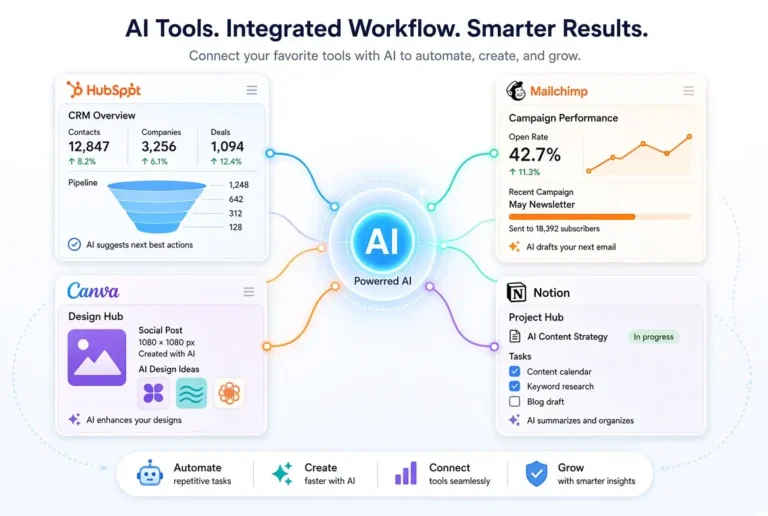
1. Canva (Magic Studio)
Best overall for non-technical marketers
Why it stands out
- Extremely beginner-friendly
- Combines AI image generation, background removal, Magic Write, and thousands of templates
- Excellent for social media posts, presentations, and simple ads
- Strong free plan
Limitations
Advanced AI features and brand kits work better on paid plans.
Best for
Everyday marketing visuals and social content.
2. Microsoft Designer / Image Creator
Best free AI image generator for beginners
Why marketers like it
- Free and easy to use
- Powered by strong image generation models
- Good for creating original images from text prompts
- Integrates well with Microsoft tools
Limitations
Fewer templates and design editing features than Canva.
Best for
Generating custom images quickly at no cost.
3. Adobe Express (with Firefly)
Best for higher-quality marketing assets
Why it’s useful
- Powered by Adobe Firefly (strong commercially safe AI images)
- Clean interface designed for non-designers
- Good templates and quick editing tools
- Strong for social graphics and simple brand assets
Limitations
Some advanced features require a paid plan.
Best for
Marketers who want more polished, brand-safe visuals.
4. ChatGPT + DALL·E (or built-in image generation)
Best for custom image concepts
Why it works
- Excellent at turning detailed descriptions into images
- Easy to iterate (“make it more minimal,” “change the background,” etc.)
- Convenient if you already use ChatGPT for writing
Limitations
Not a full design tool. You still need another platform to turn images into finished posts.
Best for
Creating unique images and concept visuals.
5. Other Notable Tools
- Ideogram – Strong at generating images with readable text
- Leonardo.ai – More advanced, better for users willing to learn
- PhotoRoom – Excellent for product photo backgrounds and quick edits
- Remove.bg – Fast background removal
These work well as supporting tools rather than primary platforms.
Simple Comparison Table for AI Image and Design Tools for Marketers
| Tool | Best For | Ease of Use | Free Plan | Design Templates | AI Image Generation | Overall for Non-Designers |
|---|---|---|---|---|---|---|
| Canva | Everyday marketing visuals | Excellent | Strong | Excellent | Good | Excellent |
| Microsoft Designer | Free custom images | Excellent | Strong | Limited | Excellent | Very Good |
| Adobe Express | Polished brand assets | Very Good | Good | Very Good | Excellent | Very Good |
| ChatGPT + DALL·E | Custom image concepts | Excellent | Good | None | Excellent | Good |
| Ideogram | Images with text | Very Good | Good | Limited | Excellent | Good |
Recommended Starting Stack
Most non-technical marketers get the best results with this simple combination:
- Canva as the main design platform
- Microsoft Designer or ChatGPT image generation for custom images
- PhotoRoom or built-in background removers for quick product/profile edits
This stack covers nearly all everyday visual needs without complexity.
Practical Workflow for Creating Marketing Visuals with AI
- Decide the goal of the visual (social post, ad, blog header, presentation)
- Generate or choose a base image with AI
- Add text, brand colors, and logo in Canva or Adobe Express
- Create platform-specific sizes
- Do a final review for clarity and brand consistency
This process often takes 10–20 minutes once you are familiar with the tools.
Tips for Better Results
- Be specific in image prompts (style, colors, mood, composition)
- Keep text on visuals minimal and readable
- Use consistent colors and fonts across your content
- Always check how the image looks on mobile
- Avoid overcrowding graphics with too many elements
- When using AI-generated images for commercial purposes, review the tool’s usage rights
Common Mistakes to Avoid with AI Image and Design Tools
- Relying only on AI-generated images without adding brand elements
- Using low-contrast text that is hard to read
- Creating visuals that look too generic or “AI-like”
- Ignoring platform size requirements
- Overusing the same style until content feels repetitive
Final Thoughts
You no longer need design skills to produce professional marketing visuals. The right AI tools make it possible to create clean, effective graphics even if you have never opened Photoshop.
Start with Canva and one AI image generator this week. Create a few real assets for your next campaign or social posts. Most non-technical marketers are surprised by how quickly they can produce useful visuals once they move past the “I can’t design” mindset.
For the complete overview of AI marketing tools, see the main pillar:
The Best AI Tools for Marketing in 2026
Related articles:
- The Best AI Tools for Content Writing and Ideation
- Best AI Tools for Email Marketing for Non-Technical Marketers
- AI for Social Media Management – Simple Tools Comparison
Frequently Asked Questions
For many everyday marketing needs (social posts, simple ads, presentations), yes. For complex brand systems, packaging, or high-end campaigns, a designer is still valuable.
Canva is currently the easiest and most complete option for non-technical marketers.
It depends on the tool. Adobe Firefly and some others are trained for commercial use. Always check the specific tool’s terms before using images in paid ads or client work.
No. Free plans of Canva and Microsoft Designer are strong enough for most beginners. Paid plans mainly unlock more assets, brand kits, and higher limits.
Yes. Canva and Adobe Express both offer simple AI-assisted video features suitable for short social content.